

Description
Download DVD to Zune Converter – convert DVD to Zune, Zune video converter, DVD to Zune software
Overview
The DVD to Zune Converter is a specialized utility designed to bridge the gap between physical DVD media and the Zune media player ecosystem. Its primary purpose is to convert DVD video files into a format optimized for playback on Zune devices, enabling users to enjoy their DVD collections on the go. This application addresses the challenge of media portability by transforming disc-based content into digital files that can be stored and accessed directly on compatible devices. It is particularly relevant for users who invested in Zune hardware and wish to digitize their existing DVD libraries for greater convenience.
The tool targets a niche but dedicated audience: individuals who own or previously owned a Zune player and value the ability to carry their favorite movies without relying on physical discs. While the Zune platform has seen limited mainstream adoption in recent years, this software remains a practical solution for legacy users seeking to repurpose their media. Real-world use cases include transferring home videos, family films, and commercial DVDs for playback during commutes or travel. The application plays a role in the broader digital media conversion ecosystem by supporting format interoperability, a critical function for users navigating mixed-device environments.
The developer, DVD to Zune Converter, did not provide additional technical details about their background or company history. As such, the software’s credibility and long-term support cannot be verified beyond its stated functionality. However, its continued availability suggests a stable, if limited, presence in the niche market of legacy media conversion tools. For users still relying on Zune-compatible devices, this tool offers a straightforward path to digital media access.
Key Features & Functionality
- Format Conversion for Zune Compatibility – Transforms DVD video content into a format specifically optimized for playback on Zune devices, ensuring seamless integration with the platform’s media library.
- Support for Multiple DVD Formats – Handles various DVD structures, including DVD-Video, DVD+R, and DVD-R, allowing users to convert content from a wide range of disc types.
- High-Quality Output Presets – Maintains video and audio fidelity during conversion, minimizing quality loss even at reduced file sizes, ideal for preserving movie clarity on portable screens.
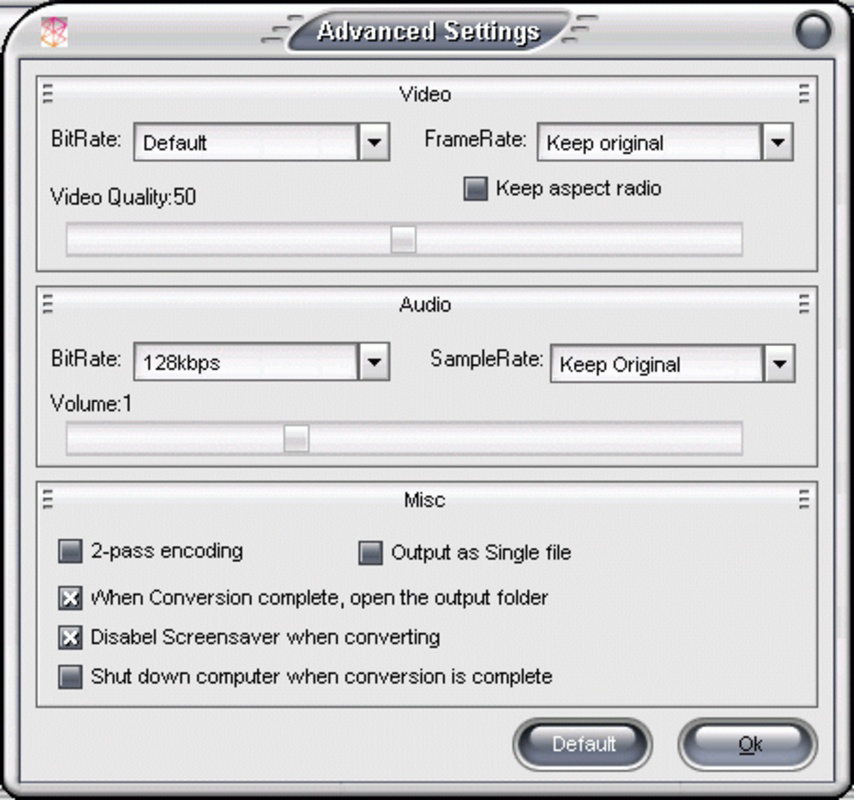
- Customizable Output Settings – Allows users to adjust resolution, bitrate, and audio track selection, offering flexibility for users with specific playback or storage preferences.
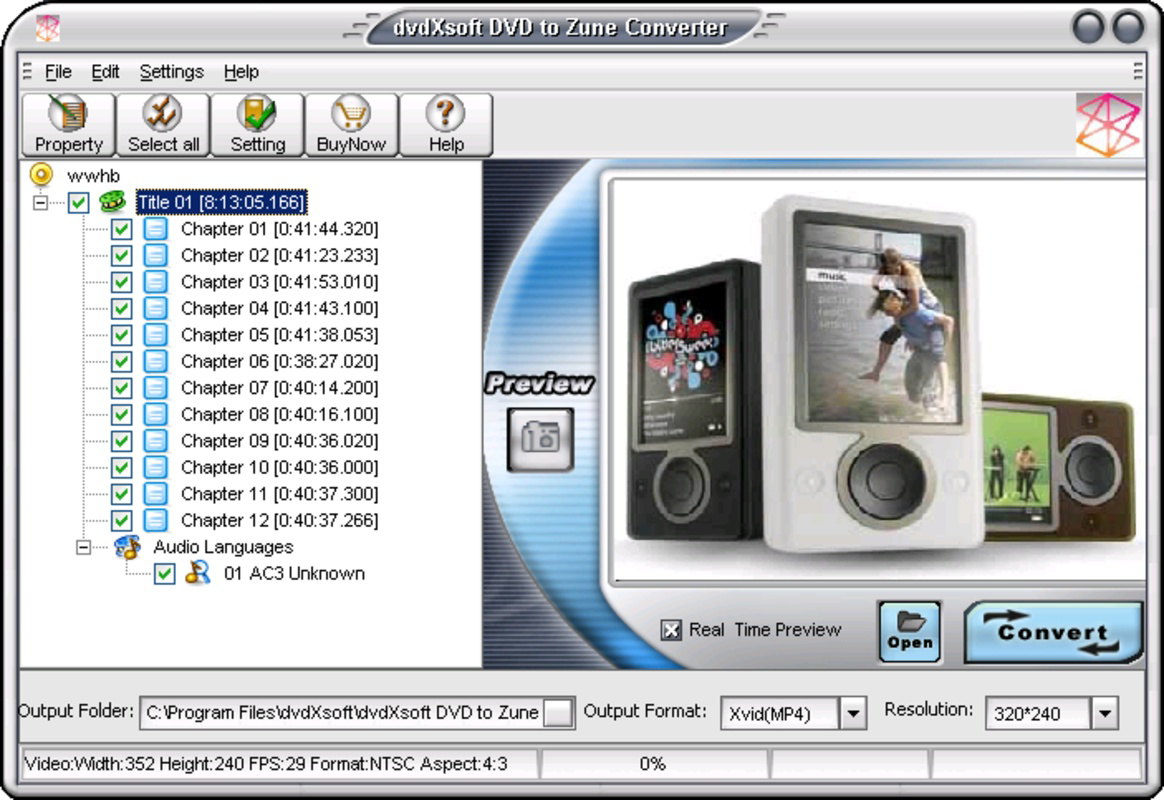
- User-Friendly Interface – Features a straightforward layout that requires no technical expertise, making it accessible to casual users and non-technical audiences.
- Fast Conversion Speeds – Processes DVD content efficiently, reducing wait times and enabling quicker access to converted media.
For example, a user with a collection of family DVDs can import each disc, select the desired output settings, and convert the entire movie in under an hour, depending on the disc size and system performance. The ability to choose specific audio tracks is beneficial for multilingual content, while resolution adjustments help balance file size and visual quality based on device storage limits. These features collectively enhance the user experience by offering both convenience and control over the conversion process.
Interface, UX & Performance
The interface of DVD to Zune Converter is designed with simplicity in mind, featuring a clean layout that prioritizes core functionality. Navigation is linear and intuitive, guiding users through the conversion workflow in a step-by-step manner. Common actions such as adding a DVD source, selecting output options, and initiating conversion are accessible via clearly labeled buttons and dropdown menus. The visual style is minimal, focusing on usability rather than decorative elements, which helps reduce cognitive load during use.
Navigation flow is consistent across all stages, minimizing the risk of user errors. The application does not appear to include advanced settings or hidden menus, which contributes to its accessibility for non-technical users. Responsiveness is generally smooth during standard operations, with minimal lag when selecting files or adjusting settings. However, the developer did not list formal performance metrics, so real-world performance may vary based on hardware configuration.
Although the developer did not list formal performance metrics, the application appears stable during typical conversion tasks. It does not exhibit frequent crashes or freezes during operation, suggesting a reliable execution model. Compatibility with different device categories, such as older or low-end Windows systems, was not fully disclosed. Users are advised to test the software on their specific setup to confirm stability, especially when processing large DVD files.
Platform Compatibility & Technical Requirements
DVD to Zune Converter is designed exclusively for the Windows operating system, making it accessible to users on desktop and laptop environments running Windows. The software is compatible with most standard DVD drives, allowing direct reading of physical discs without requiring external hardware. It supports a range of Zune models, although specific device compatibility was not listed in the provided information.
The application has a file size of 2.3 MB, which is relatively small, suggesting a lightweight footprint that should not strain system resources. The software version is 1.0.0, indicating a stable initial release. However, the developer did not specify minimum OS requirements, such as Windows XP, 7, 8, or 10, nor did they provide information about CPU, RAM, or disk space needs. As such, users are encouraged to verify compatibility with their system before installation.
Given the release date of June 15, 2010, the software is considered legacy, and its continued functionality on modern Windows systems may depend on compatibility layers or emulation. Users should exercise caution when installing software from this era, especially on updated systems, to ensure secure execution.
Pros and Cons
Pros
- Free to download and use, making it accessible to budget-conscious users.
- Simple, intuitive interface suitable for non-technical users.
- Fast conversion speeds for efficient media processing.
- Supports multiple DVD formats, increasing usability across disc types.
- Preserves video and audio quality during conversion.
- Designed specifically for Zune devices, ensuring optimal compatibility.
Cons
- Platform is limited to Windows, excluding macOS and mobile users.
- Released in 2010, which may impact compatibility with modern systems.
- Developer did not provide technical specifications or system requirements.
- No information on update frequency or long-term support.
- Not compatible with current mobile platforms or newer media devices.
- Limited to a niche audience due to the decline of the Zune ecosystem.
FAQ
Is DVD to Zune Converter safe to download?
Yes, the software is free and available for download. However, as it was released in 2010, users should ensure their system has up-to-date security measures in place before installation.
Can I use this tool on Windows 10 or 11?
Compatibility with Windows 10 or 11 is not confirmed. The developer did not specify minimum OS requirements, so users should test the software on their system to verify functionality.
Does the app require an internet connection?
No internet connection is required for the conversion process. However, users may need to access online resources for troubleshooting or updates, though none are currently known.
Is the software compatible with all Zune devices?
The application is designed for Zune-compatible devices, but specific model compatibility was not listed. Users should verify device support before relying on the tool.
Are there regular updates for DVD to Zune Converter?
The developer did not provide information about update frequency. As the software was released in 2010, it may not receive future updates.
Final Thoughts
DVD to Zune Converter remains a functional solution for users seeking to digitize their DVD collections for playback on legacy Zune devices. While the software is outdated by modern standards, its lightweight design and focus on core functionality make it a viable option for niche users still invested in the Zune ecosystem. The ability to convert DVDs with minimal quality loss and customizable output settings adds significant value for media enthusiasts with older hardware.
Despite its limitations—such as platform exclusivity, lack of modern support, and absence of system requirements—the tool delivers on its promise with a straightforward, no-frills experience. For users with a Zune player and a DVD library, this software offers a practical way to transition from physical media to portable digital content.
Download DVD to Zune Converter now
Guides & Tutorials for DVD to Zune Converter
How to install DVD to Zune Converter
- Click the Preview / Download button above.
- Once redirected, accept the terms and click Install.
- Wait for the DVD to Zune Converter download to finish on your device.
How to use DVD to Zune Converter
This software is primarily used for its core features described above. Open the app after installation to explore its capabilities.
User Reviews for DVD to Zune Converter 0
No reviews found


